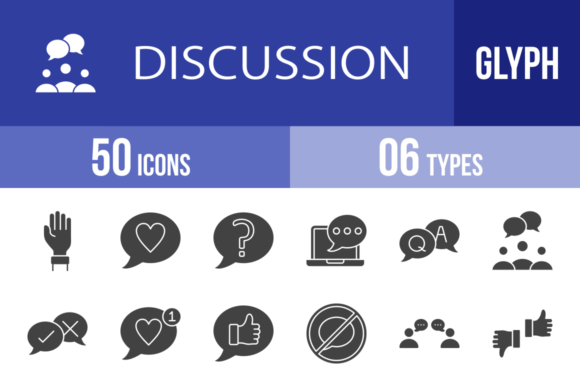
50 Discussion Glyph Icons: Visual Language for Modern Communication
Designing Conversations That Actually Connect
Every designer, marketer, and content creator faces the same challenge: how do you visually represent conversation, feedback, and human connection without relying on tired stock imagery? The 50 Discussion Glyph Icons collection tackles this problem head-on with a unified set of vector symbols built around dialogue, collaboration, and digital communication.
What makes this collection stand out isn't just the icon count—it's the intentionality behind each glyph. These aren't generic chat bubbles pulled from a massive icon dump. Each symbol in the 50 Discussion Glyph Icons set was designed using a unigrid system, meaning every icon shares consistent stroke weights, proportional relationships, and optical balance. Whether you're scaling a Raise Hand icon for a presentation slide or placing a Video Conference symbol on a mobile app interface, the visual rhythm stays cohesive.
The collection covers real conversational scenarios designers actually encounter. You get nuanced communication states like Agree Disagree, Yes No, and Like Chat—the kind of visual shorthand that modern UI design and social media graphics demand. There's also practical infrastructure: Phone Call, Mail, Web Chat, and Email Discussion icons that work across web design, mobile apps, and print without feeling dated.
Where These Icons Earn Their Place in Your Toolkit
Think about the last time you designed a landing page, pitch deck, or app mockup. You probably needed icons for testimonials, support sections, FAQ areas, or community features. The 50 Discussion Glyph Icons set handles all of these because it's built around a single visual language: people talking to each other.
For mobile app designers, icons like Mobile Chat, Smartphone, Tablet Chat, and User Chat provide ready-made visual vocabulary for messaging interfaces, notification systems, and onboarding flows. The Chat Bubble and Chat Network glyphs work particularly well for illustrating communication features without adding visual clutter.
Web designers and developers will find the Browser Discussion, Online Meeting, and Web Chat icons useful for SaaS landing pages, help center designs, and customer support interfaces. Pair these with the Feedback and Q & A symbols, and you've got a complete visual system for any platform that involves user interaction.
The collection also serves print and editorial design effectively. Magazine layouts, brochures, and presentation templates benefit from icons like Team Discussion, Group Chat, and Children Discussion—especially when you need to illustrate collaboration or community themes without photography. The Mediator and Opinion icons add conceptual depth that works in corporate communications and nonprofit materials alike.
For brand identity projects, the stylistic consistency of these icons matters. When you're building a logo design system or developing packaging design for a communication-focused brand, having access to 50 cohesive glyphs means you can extend visual language across touchpoints without mixing icon styles. The Global Conference and Translate icons, for example, support international or multicultural brand narratives beautifully.
Practical Guidance for Working With This Collection
The 50 Discussion Glyph Icons come in six formats: AI, CDR, EPS, JPG, PNG, and SVG. That range covers virtually every workflow. SVG files are ideal for web design and responsive interfaces since they scale without quality loss. The AI and EPS formats give you full editability in Illustrator or similar vector software—essential when you need to adjust stroke weights, colors, or proportions to match an existing brand identity.
The inclusion of 20 PNG sizes is particularly thoughtful. Rather than exporting your own raster versions, you get pre-rendered sizes ready for quick implementation. This matters when you're working under tight deadlines on social media graphics, presentation templates, or content management systems that don't accept vector uploads.
Evaluating Fit for Your Project
Before committing to any design assets, spend ten minutes reviewing the full icon list against your actual needs. Do you need device-specific symbols? The set includes Laptop Chat, Tablet Call, Computer Chat, and Video Call—covering the major device categories. Are you building a community platform? Group Chat, Chat Network, and Online Talking give you the right conceptual vocabulary.
Test how the icons interact with your existing font pairing choices. These glyphs have a clean, modern typography sensibility that pairs well with sans serif font families—particularly geometric and humanist styles. If your brand uses a serif font for headings, the icons' simplicity should complement rather than compete. Avoid pairing them with highly decorative script font or handwritten font styles, which can create visual tension with the icons' structured geometry.
Scaling and Color Considerations
Because these are 100% vector icons, you can recolor them to match any palette. Test visibility at small sizes—a Coffee Break icon might lose detail when reduced to 16 pixels, while Chat Bubble remains legible. The unigrid system helps here: consistent internal spacing means most icons maintain readability across scales, but always verify at your target size.
For commercial use, review the licensing terms before deploying in client work or products for sale. Most premium font and icon licenses cover standard commercial applications, but extended uses—like embedding in software products or mass-produced merchandise—sometimes require additional permissions.
Making These Icons Work Harder
The real value of a cohesive icon set multiplies when you establish rules for its use. Define minimum sizes, standard colors, and consistent placement patterns within your projects. When the 50 Discussion Glyph Icons become part of a documented design system rather than ad-hoc decorations, they reinforce professionalism and visual hierarchy across every touchpoint.
Use the Yes Banner, No, and Yes icons for status indicators in dashboards or approval workflows. Deploy Calling and Phone Call for contact sections. Reserve Love Chat and Person Like for engagement features or social proof areas. Each icon in this collection has a clear communicative purpose—leverage that specificity rather than treating them as interchangeable decorations.
Good design communicates clearly. These 50 discussion-focused glyphs give you the visual tools to represent conversation, collaboration, and connection across any medium—consistently, professionally, and at any scale your project demands.